Quick Trick

Still sick, so I’ll make this quick.  Here’s a trick I use because I change art out often.  Use washi tape to hold art in place.  I know, I know.  Not revolutionary, but it is easier to use than regular clear tape.

Washi-Tape-for-Framed-Photos

The light tack won’t tear the art or the mat when you’re ready for a change.  But check to make sure the tape is acid free so it doesn’t damage the art or photos.

Washi-Tape-for-Photos

How about a few favorite Washi tape favorites and sources?  Dots and StripeGrey Star, Gold Dots and almost everything else in the Pretty Tape shop.

Pretty-Tape-Shop-Sample

The Washi Shop has oodles of fun washi tape designs like Orange Chevron, Gold Stripe, and Hot Pink Hearts.

Modern Tape in another shop stocked with washi eye candy.  Glitter tape, Gold Plaid, and Navy Waves are my favorites.

Of course Target is another favorite source.  Check in the office supply section for a pack of four.  What are you using washi tape for?  Care to share your favorite sources?

P.S.  The Our Humble Abode 50% off sale ends tonight.  Use the coupon code RINGIN2013 to activate the discount.

I’m Board

Oh yes, I know that’s the wrong type of board.  That’s a hint for you.  I’ve gotten a few questions about mood boards, so here’s what I do.  Professional designers probably have a quicker, better method, so if you’ve got tips or tricks, feel free to share in the comment section.

Are you ready?  Here goes nothing.  First, open a new document in Photoshop.  The canvas can be any size and resolution, you can always change it as you go.  I typically make mine 9 inches wide by 5 inches tall at 180 dpi.  Now, find an image of the items you want to add.  To make it easy on myself, I go to a website and take a screen shot and paste it (Control + V) on my canvas.  This automatically adds each item as a new layer.  When possible, use an image against a white background.

To remove a colored background, select the eraser tool, adjust the diameter, leaving the hardness at 100 percent.
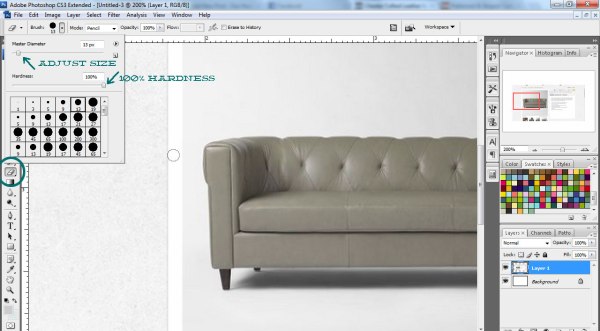
For me, the easiest way to erase a background is using a small eraser tip, holding the shift button, and carefully clicking around the edges.  For straight lines, click once at the far end, hold shift and click at the opposite and it will make a straight line.  To go around corners, follow this same procedure, making smaller clicks to go around.
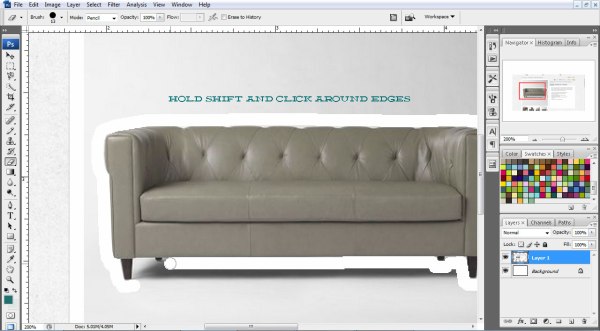
After tracing all the edges, erase the remaining background with a larger eraser tip.  If you want the item larger or smaller, click the rectangular marquee to make a box around the item.  Right click and select ‘Free Transform’.  Hold shift to enlarge proportionately and hit enter when you like the size.

You’ve made one item!  Go back to another image, screen shot, and paste it in.  Rename the new layer right away so you’re not searching through once you’ve added several items.

Erase the background on this one, too.

After tracing the outline, go back in with a larger brush tip to make this quicker.

Keep on adding items.  If you get an item you want to rotate, select the marquee, right-click, and choose ‘Free Transform’.  While holding shift, turn the item.

See that rug above?  Well, I don’t want it to lay over the couch.  Find that layer and drag it under the rest, making it the first layer.  Now the rest of the layers will sit on top if it.

If you want to add two of one item, select the layer, right-click on it, and select ‘Duplicate Layer’.

Photoshop places the new layer over the existing one, so move it where you want and you’ve got a pair.  If you want to flip it, use the marquee tool, right-click, and select ‘Flip Horizontal’.

For paint swatches, I think this method is the quickest.  First, paste the screen shot of the color.  Use the marquee too to make a square on the swatch.  Push Control and C at the same time to copy, then Control and V to paste the selected square.

Delete the screen shot of the swatch and move your new little box over to fit in your board.

Then you can choose accent paint colors and layer those on top.

It’s up to you if you want to arrange the furniture to look like a room.  Or just group pieces together to get an idea of the elements as a whole.

P.S.  If you’re having a hard time seeing the details, click on the picture to enlarge it.

P.P.S.  All keyboard short cuts mentioned are for PC, not Mac, though they are similar.

Bag of Health

We’ve never had a bathroom that didn’t have drawer storage.  So, I’m working on a few ideas to make the main bathroom as functional as possible, sans drawers.  I’m still searching for the perfect baskets, but I decided to make a zippered bag to store first aid supplies.  To get started, I bought a yard of silver metallic ironing board cover (hey, it was cheap, durable, and shimmered) and a 12 inch blue zipper.

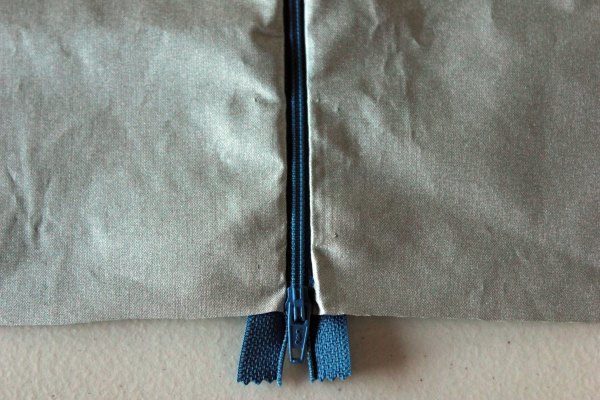
Knowing I want to fit all our first aid supplies in one bag, I cut two pieces of fabric 12 inches wide by 17 inches long.  Yes, this is going to be big.  Then, I placed my fabric on the table, right side up.  Lay the zipper over, face down, keeping the bottom edge of the zipper flush with the bottom edge of fabric.  Pin in place.

If you have a zipper foot for your sewing machine, now is the time to use it.  I thought I did, looked all over for it, and couldn’t find it.  Instead, I sewed the zipper on by hand.  Sew close to the zipper without running into it.

Once you’ve sewn one side on, add the second piece of fabric putting the right sides of the fabric together.  Sew along the zipper edge again.    When the fabric is folded over, right sides out, the zipper will have a nice clean edge.

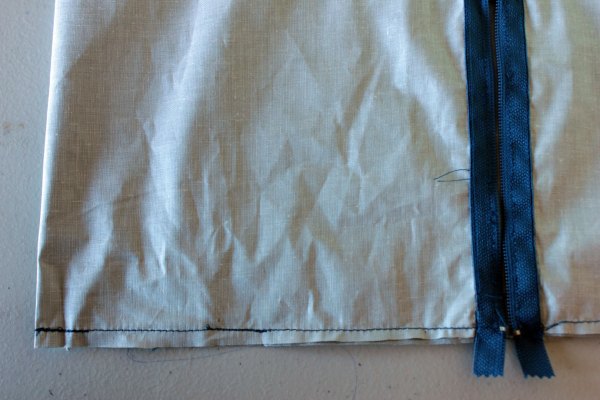
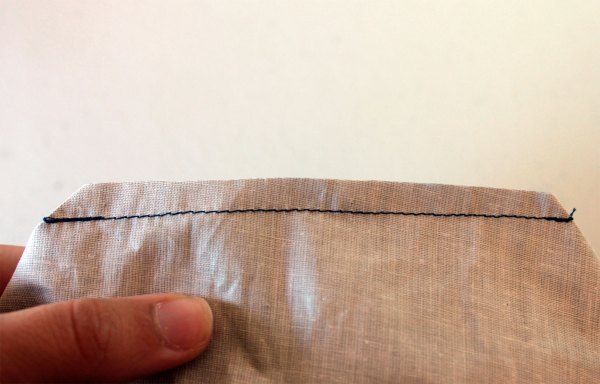
Because I sewed this by hand, I went back over and added top stitching with my machine, following along the edge of the fabric for a straight line.

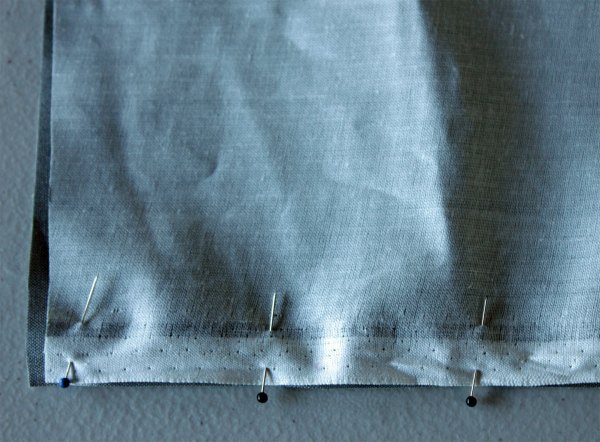
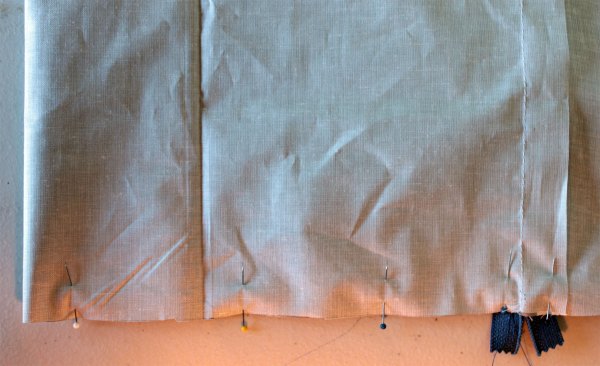
Now face right sides of the fabric together and pin along the bottom.

Sew along the edge, leaving a half-inch allowance.  Unzip your zipper few inches-this is crucial to turn it right sides out when you’re done.  Leave the fabric wrong side out.  Pin the edges and sew a straight line, a half-inch from the edge.  Do this to both sides.

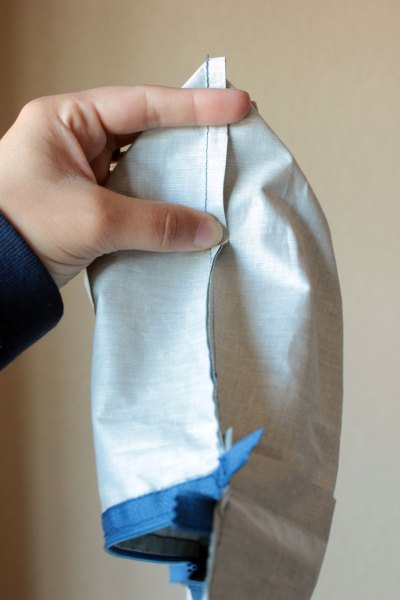
If you were to turn it out right now, you’d have a flat bag.  To give it a boxy shape, pinch the corners together.

I found it easiest to put one finger in the corner of the bag, holding it upright, then flattening the point like this:

Your point will be perpendicular to the edge seam.  Pin the corners to hold in place.

For my first corner, I made a straight lone across and sewed along the line.

Then I measured my width and marked the three remaining corners at five inches, just like my first one.

After sewing all four corners, cut about a quarter-inch above.

Then fill your bag up with cosmetics, travel toiletries, or first aid supplies.

To make a different sized bag, keep this in mind:

  • The zipper length will determine how big the bag is from front to back.  I had a 12 inch zipper, so I cut my fabric 12 inches wide.  For an 8 inch zipper, cut your fabric 8 inches wide.
  • The length of the fabric will change how wide it is from side to side.  I cut my fabric at 17 inches, which is really wide.  For a size more like a regular cosmetic bag, cut the fabric between 8 and 12 inches.
  • For a boxier bag, widen your corners.  I pinned mine at 5 inches, which I think would be perfect for a cosmetic bag, but that can change.

Stone Cold

Here’s the much requested stone counter cutting post.  Let’s dive in.  Well, not literally because smashing your head into the counter doesn’t sound like fun.

To cut your own stone counter top, you’ll need:

  • A skill saw with diamond blade
  • A right angle grinder with diamond blade and stone polishing pads
  • Clamps
  • A straight edge
  • A hose with running water
  • A GFI protected outlet
  • Saw horses or another system to hold the stone up
  • Protective gear for eyes, ears, mouth, and nose

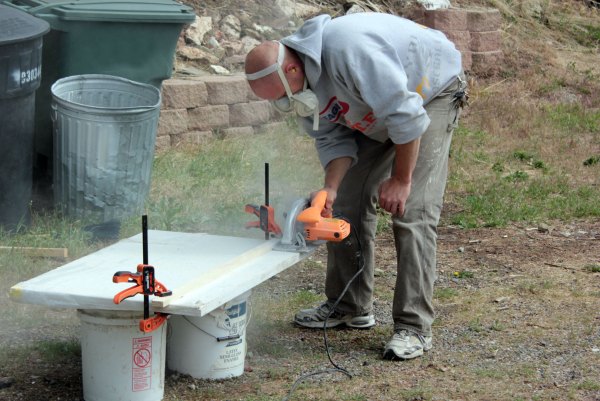
Now you know the ingredients, let’s get to the instructions.  If you need to cut length off your stone, first mark where you want to cut.  Then, measure the guard of your skill saw.  Clamp a straight edge factoring in the width of your guard.

While wearing protective gear, slowly and carefully cut along your guide.

Now you’re ready to start polishing.  Ben asked the local granite companies for their used polishing pads, so ours were free.  To get a new set, check the link above or search ‘granite polishing pads’ to find a better deal.  Here’s what the pads look like:

For a polished finish, the pads work best wet.  Ben clamps a slow running hose to the counter top to let the water trickle over the edge.  Remember, electricity and water are not friends!  Plug your grinder in a GFI protected outlet and keep your plugs out of the water.  Use extreme caution.  Then sand the edges just like you would with a normal sander on wood.  Keep it moving to avoid gouges and slightly round the edge for a factory-finished look.

Polishing didn’t take nearly as long as cutting the sink hole did.  Ben only uses drop in sinks so he doesn’t have to have a nice looking cut, just a place for the sink to go in.  Use the sink template to mark the cut lines.

Take the polishing pad off the grinder and replace it with a diamond blade.

Plunge cut the sink hole slowly and carefully.  You won’t be able to cut through with one pass.  Slow and steady on this.  Clean the dust and water off and you’ve made yourself a stone counter top.

The polished eased edge looks just as good as the granite company, too.

What do you think?  Are you willing to try this at home?  What is your favorite type of counter top?  Granite?  Marble?  Concrete?

Disclaimer:  If you are not comfortable using this equipment, don’t try this.  Use caution and always wear safety gear.  This is an overview tutorial and we cannot be held responsible for injuries.  

You Say Suspenseful I Say Fenceful

After this post, a lovely reader asked if we could write-up a quick post about our fence and how we made it.  Always happy to answer questions, here it is.

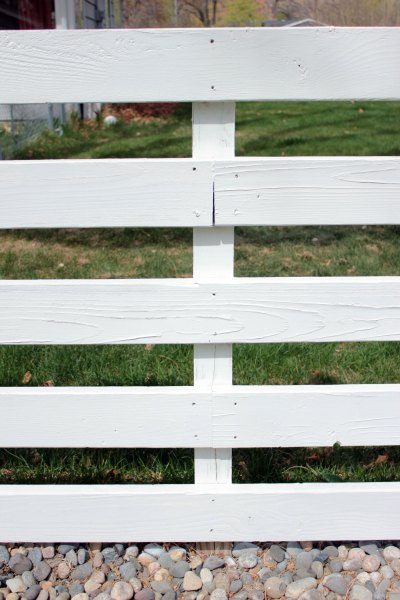
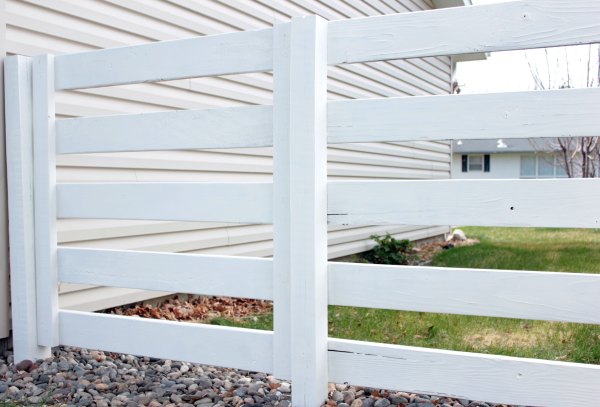
The fence is made up of 4 inch by 4 inch by 8 foot long posts and 2 inch by 6 inch by 16 foot long lumber from Home Depot.  Ben measured eight feet apart, used a post hole digger to make a 4 foot deep hole.  He did this for each post, 22 total on our property.  After setting each post, leaving it 4 feet above ground, we attached the 2 by 6 horizontals.  These are about 4 inches apart, for a total of five high.

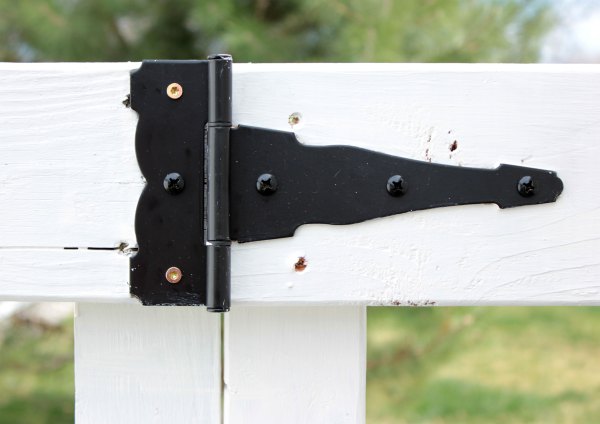
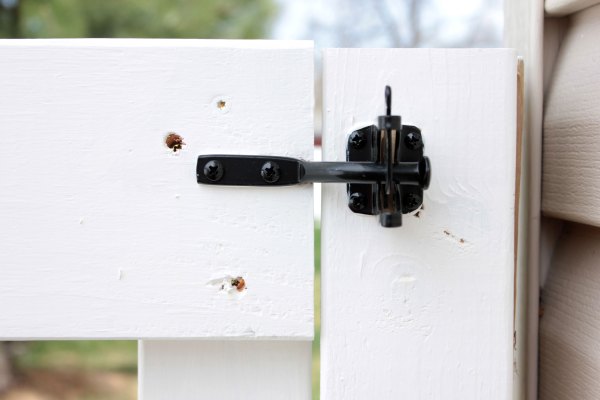
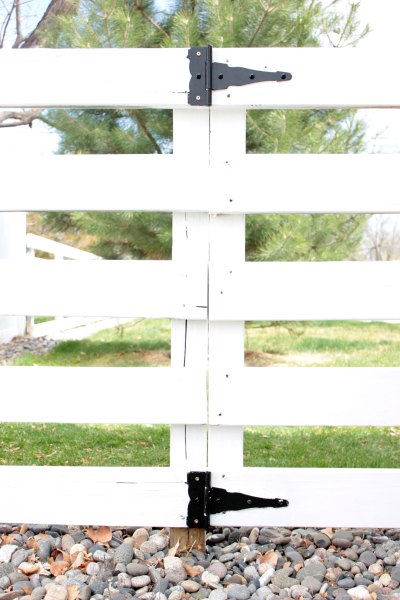
We staggered the seams to keep the fence as strong as possible.  The gate took longer to finish because Ben couldn’t find strong hinges.  But, with the impending closing date looming, we knew it had to happen, sooner than later.  Ben bought a set of hinges and a latch at Home Depot.

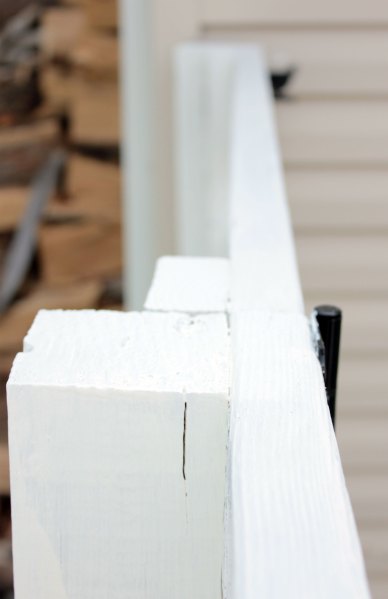
To build the gate, Ben cut a 2 by 4 to the match the height of the horizontals.  Then, he screwed five 2 by 6 pieces, keeping the gate square as he went.

On either side of the gate we have a 4 inch square post and a 2 by 4, which is actually part of the gate.

Luckily, the hinges are perfect for the 2 by 6, so Ben installed one at the top and another on the bottom to hold the gate in place.

To protect the fence and keep it looking spiffy, we use Behr’s Solid Color Wood Stain, just like the rest of the fence.  So, that’s the simple fence we have and how to make one yourself.

Previously, we had a chain link fence, which Houdini, I mean Jack escaped from regularly.  We’re happy to report she hasn’t been able to get out of this one.  Also, this style fence can work for smaller dogs by adding 2 by 2 pieces between the 2 by 6s.

What style of fence do you have?  Why did you choose it?  To keep kids and pets in?  To keep neighbors out?